How to Get Water Out of Phone Speakers: Expert Guide (2026)
Water damage causes nearly 39% of all smartphone repairs, and speakers are often the first part to suffer. Phone owners frequently drop their devices into sinks, pools, or get caught in the rain, which quickly muffles the sound. When moisture gets trapped inside, it becomes harder to remove water from the speaker without proper steps. Certified repair professionals see this issue daily and know that phone speakers easily hold water, leading to distorted or quiet audio if not treated quickly.
You hear distorted calls or weak music after a splash. Clear audio vanishes, and frustration builds when voices sound far away. Every day, accidents like spills or workouts near water create these problems.
The Science Behind Water Damage in Phone Speakers
Phone speakers suffer from three main water problems. Water messes with the tiny coils and circuits first. It shorts out electrical signals and makes sound weak or crackly right away. Moisture creates paths for current to leak where it shouldn’t.
Second, corrosion starts fast. Minerals in water leave deposits on metal parts within hours. These eat away at speaker contacts and coils over time. You hear muffled audio that gets worse each day.
Third, water ruins the speaker membrane. It soaks the thin material that vibrates for sound. The membrane loses shape and can’t move right anymore. Permanent distortion follows even after drying.
Signs of Moisture in Your Speaker
Water in your phone speaker changes how the sound comes out. You hear music or calls through a pillow. Voices feel far away and dull. This muffling happens when moisture sits on the speaker parts.
Play a song at full volume to check. Good speakers blast clear bass and highs. Wet ones sound weak or bubbly. Turn up podcasts too; clear words vanish into mush. Nobody misses that fuzzy audio drop.
Look closely at the speaker grill. Wet phones leave water spots or marks. Dust sticks more when moisture traps it. Test calls show crackles or pops that dry speakers never make.
Why Remove Water Fast? Key Reasons
Water sits in your speaker grill after a splash. Sound quality drops right away. You miss beats in songs or words in calls. Dry it out to hear crisp audio again across music, videos, and alarms.
Restores Audio Quality
Water blocks speaker vibrations. Music loses bass and highs. Calls sound far away. Remove moisture to get back a clear, balanced sound every time.
Prevents Long-term Damage
Moisture starts corrosion on metal parts within hours. Minerals build up and eat away at coils. Act fast to stop permanent speaker failure down the road.
Increases Phone Performance
Wet speakers mess with apps and voice commands; videos stutter. Sensors nearby act up. Clear the water so your phone runs smoothly on all tasks.
Improves Call Clarity
Calls turn muddy with water inside. You strain to hear others. They complain about your voice, too. Dry speakers make both sides sound sharp and loud.
Maintains Device Value
Repair shops cut trade-in prices for water damage. Buyers spot bad audio fast. Keep speakers dry to hold top resale value when you upgrade.
Ensures Reliability
You count on your phone daily for alerts and navigation. Wet speakers fail at bad times. A dry phone stays ready without surprise audio drops.
Avoids Annoying Distortions
Crackles and pops ruin podcasts or games. Buzzing starts at any volume. Water causes these noises; remove water from the speaker to ensure clean playback.
Saves Money on Repairs
Speaker fixes cost $50-150 at shops. Full replacement runs higher. Quick drying now skips those bills and keeps cash in your pocket.
Emergency Response Protocol (First 5 Minutes)
The first five minutes count most after water hits your phone. Act fast to cut damage risk. Follow these steps to protect your speaker right away.
Immediate Power Down (Critical)
Turn off your phone within 30 seconds of getting wet. Remove the battery if your model lets you. Unplug all cables and accessories now. Power sends current through water and fries circuits fast.
Initial Assessment
Pull the phone from the water at once. Note how much water touched it and what kind: tap, pool, or salt. Check if sound works at all, but skip full tests. This tells you the damage level quickly.
Protective Measures
Take off the case and any covers. Wipe outside parts with a microfiber cloth. Set the phone down with the speaker facing down at a 45-degree angle. Let gravity pull water away from the insides.
Skip charging or shaking hard. Keep it still and dry during these steps.
What to Do If Water Gets in a Phone Speaker
Turn off your phone right away if water hits the speaker. This cuts power and stops short circuits from frying internal parts. One switch saves circuits from instant damage.
Pull off headphones, chargers, and cases next. These create paths for electricity through water out. Remove them to block extra risks during drying.
Skip the heat or hard blowing after the first steps. Those push water deeper into the speaker parts. Safe removal works better than quick fixes that make things worse.
Remove Water from Speaker: A Safe Step-by-Step Guide
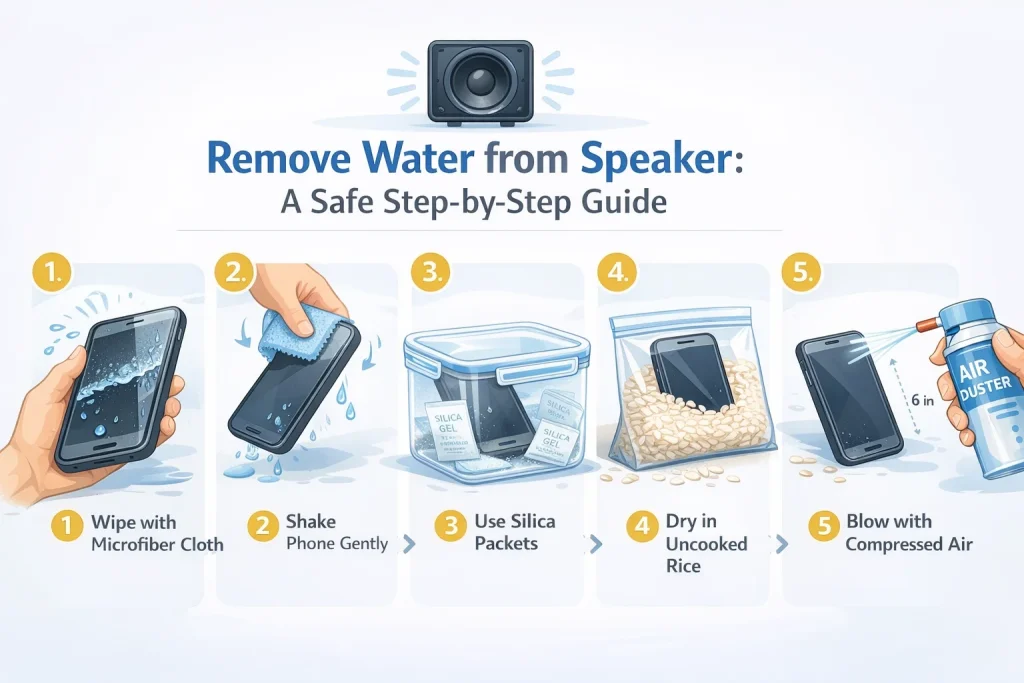
- Wipe out the visible water: Grab a lint-free microfiber cloth. Gently dab the speaker grill and edges. Wipe away drops without pressing hard. This stops water from soaking deeper inside.
- Shake your phone: Hold your phone firmly with the speaker down. Shake gently side to side. Let gravity pull water drops free. Tap lightly on your hand after shaking out more.
- Silica-gel packets: Put the phone in an airtight bag or box. Add 4-5 silica packets from shoeboxes. Seal for 24 hours. Packets suck moisture fast without a dust mess.
- Drying through Rice: Seal the phone in a ziplock bag with uncooked rice. Leave for 24-48 hours. Rice pulls water but works more slowly. Keep grains out of openings to avoid dust.
- Using a Blower: Grab canned air or a cool blower. Hold 6 inches away from the speaker. Short bursts push water out. Skip hot air, it cooks internals.
How Can Water Eject Sound Remove Water from Speaker Sound?
Low-frequency sound waves shake the speaker grill hard. These vibrations knock water drops loose from tight crevices inside. Droplets fly out through the tiny holes instead of being trapped there forever. Sound methods beat rice or heat every time for quick fixes.
Understanding the Science
Low-frequency tones from 165-190 Hz create powerful shakes in speaker parts. Water gets dislodged from membranes and coils where it hides. Bass vibrations match water droplet size perfectly for ejection. Physics makes this work without touching the internals.
Activating the Feature
Open browser tools like Fix My Speaker or download Siri shortcuts for iPhone. Web versions need no app installs; just play the tone sequence. Android users find similar apps or YouTube videos tuned right. Start with phone volume maxed out.
Selecting the Intensity
Choose medium power first to check the speaker response safely. Heavy pool splashes call for high-intensity blasts. Low settings test without stressing parts. Pick based on splash size and time since wetting. Watch for flying drops to gauge strength.
Waiting for Completion
Play tones at full volume for 30-60 seconds straight. Position the speaker down at 45 degrees during playback. Gravity teams up with vibrations to pull water free. You see droplets hit the table, which means success in action.
Repeat if Necessary
Run the full cycle 2-3 times if audio stays muffled after the first try. Deep water needs multiple shakes to escape fully. Space repeats by 2 minutes for settling. Most clear up by round three max.
Ensuring Dryness
Let phone air dry 15-30 minutes post-tones even if drops stopped. Test music playback,no pops confirm dryness inside. Wipe the grill clean of dust pulled out too. Full clarity returns only after this wait.
How to Use Fix My Speaker to Remove Water From Speaker
Unplug Bluetooth earbuds or speakers first. This sends all sound straight to your phone’s built-in speaker. Wrong audio paths cut the ejection power in half.
Crank phone volume to max,80-90% works best. Higher levels create stronger shakes. Low volume leaves water stuck inside the grill.
Point speaker grills down flat on a table. Gravity pulls drops out as tones play. Hold steady, no wobbling during the cycle.
Hit play on Fix My Speaker tones. Let them run 1-2 minutes full blast. Watch small water beads pop out of the holes right away.
How to Remove Water from Speaker Sound of an iPhone or Android Speaker
Wet phones kill audio quickly, music muffles, and calls fade. The iPhone’s single bottom grill ejects water easier with gravity. Android stereo speakers (top + bottom) trap drops in both spots, so treat each grill separately.
Quick Fixes Work on Both:
- Vacuum suction: Clean nozzle first; low power over grills pulls hidden water out
- Silica packets: Seal the phone in a bag with 5-6 packs, sucks moisture steadily, no rice dusty mess
- Air dry down: Speaker facing table on soft cloth, room air 24hrs max
iPhone Edge: Sonic app or Siri shortcut blasts 165Hz tones; Apple’s design loves low bass shakes.
Android Reality: Hit top/bottom grills with Clear Wave; Samsung clears dual faster than budget models.
Apply DIY Techniques
Vacuum Method: Power off phone first. Clean vacuum nozzle well. Hold the speaker grill gently on low suction. Pulls water drops without pushing dirt in.
Air Drying: Lay phone on a soft cloth in a dry room. Face speaker down for gravity help. Good airflow speeds it up. It takes 24 hours to fully dry.
Silica Gel: Grab packets from shoe boxes. Put the phone in a sealed bag with 5-6 packs. They suck up moisture steadily. Better than rice, no dust risk.
Test After: Play music loud. Clear sound means success. Muffled? Repeat steps.
How to Clean Your Phone Speaker of Water and Dust Using Sound
Sound waves shake loose water and dust from speaker grills. Max volume creates strong vibrations that push debris out. Works on iPhone and Android without touching internals.
Follow the Sound-Based Cleaning Process
Pick 165-190 Hz frequency on water eject sites or apps. Crank volume to max for powerful shakes. Lay the phone flat with the speaker down, gravity pulls junk free as tones play.
Run 30-60 seconds per cycle. Play test audio after. Muffled sound means repeat 2-3 times. Stubborn dust clears in later rounds.
Post-Cleaning Care
Air dry 30 minutes on cloth even after tones stop. Residual moisture hides deep. Test music loud; clear bass confirms success.
Use screen protectors and cases daily. Skip pockets full of lint. Wipe grills monthly with dry brush to stay ahead.
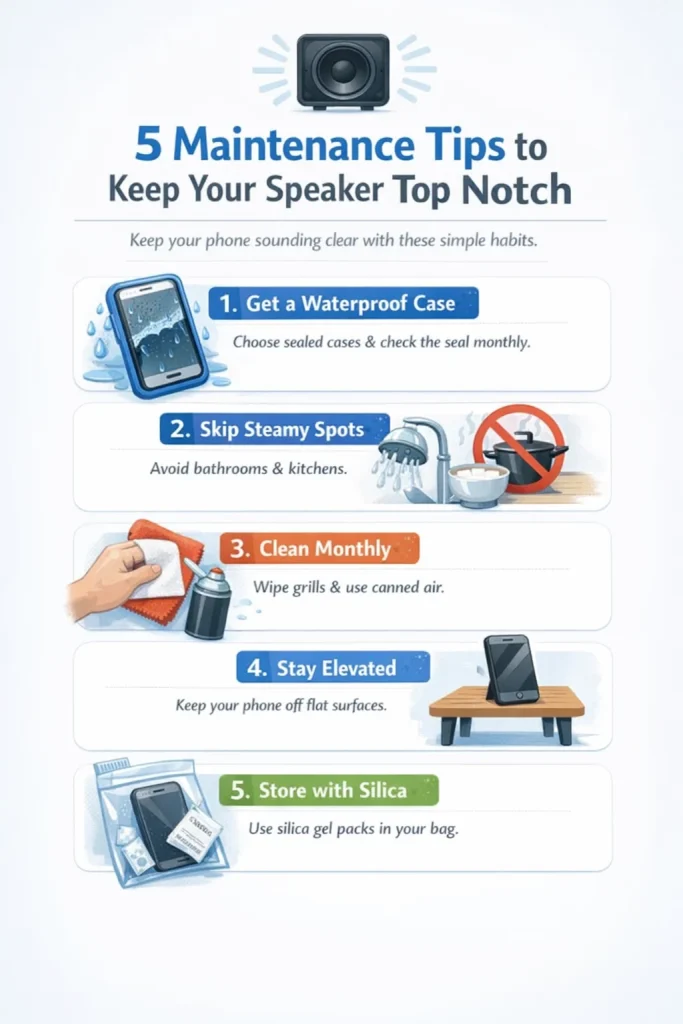
5 Maintenance Tips to Keep Your Speaker Top Notch
- Get a waterproof case: Pick one with sealed speaker grills. Check the seal monthly; cracks let water sneak in. Cases block splashes during rain or gym sweat.
- Skip steamy spots: Keep phones out of bathrooms and kitchens. Steam from showers clogs grills fast. Cook or bathe without your device nearby.
- Clean monthly: Wipe grills with a soft microfiber cloth. Use canned air for dust in holes. Never liquids, they push dirt deeper.
- Stay elevated: Set your phone on tables, not flat pockets or bags. Water pools under screens during spills. Higher spots let gravity drain better.
- Store with silica: Keep gel packets in your bag. Toss the phone in a sealed bag with them overnight. They suck up humidity before damage starts.
Quick Action Saves Your Speakers
Water in phone speakers kills sound fast, but simple fixes work every time. Turn off immediately, use water eject sound at max volume, and air dry speaker-down. Skip rice and hairdryers; they cause more harm. iPhone clear easier than Android stereo pairs, but both respond to 165Hz tones and silica packets.
Regular cleaning and waterproof cases prevent future splashes. Test speakers monthly; clear bass means you’re good. Act now to skip $50-150 shop costs and keep calls, music, and alerts sharp. Your phone stays reliable when you handle water correctly.
FAQs
What is the Fastest Way to Remove Water from a Phone Speaker?
Water eject sound beats all other methods. Play 165-190 Hz tones at max volume with the speaker facing down. Drops shake loose in 30-60 seconds. Shaking helps, but can’t match vibration power.
Can I Use Rice to Dry My Phone Speaker?
Rice soaks up some water but leaves starch dust that clogs grills worse. Tiny grains stick forever, and muffle sound more than moisture does. Silica packets work cleaner without residue risk.
Can I use the water ejection method on any iPhone or Android model?
Modern iPhone 11+ and flagship Androids clear fast. Budget Android speakers vibrate weaker, take longer. Siri shortcuts shine on iOS. All handle max volume safely.
How does the water ejection sound work to remove water?
Low-frequency bass tones shake the speaker membrane hard. Trapped water droplets vibrate loose from crevices. They fly out grill holes while gravity pulls them down. Same physics as the earbud shake feature.
Is it safe to use these methods to eject water from my phone’s speaker?
Sound ejection matches normal music playback, no extra stress. Non-invasive beats disassembly risks. Phone engineers design speakers for bass daily. Repeat cycles stay harmless.