
Ear Speaker Cleaner Sound
Ear Speaker Cleaner
Clean the earpiece — clears wax, oil, dust & water.
The ear speaker in your phone handles calls and audio playback, but it often gets clogged with dust, earwax, or moisture from daily use. This buildup leads to muffled sounds, low volume, or distorted calls that make conversations hard to follow. A phone speaker cleaner can easily remove this buildup and restore crisp, clear sound.
Many people face this problem after dropping their phone in water or letting debris accumulate over time. Tools like sound-based cleaners use targeted frequencies to vibrate and push out particles, much like gently shaking the device. Pair this with careful wipes using isopropyl alcohol for tougher spots, and you restore the original sound quality safely.
How to Use Ear Speaker Cleaner Sound
Cleaning your phone’s ear speaker is easy and only takes a few minutes. Start by wiping the speaker grill with a soft microfiber cloth to remove dust or water droplets. Open a cleaning app like Fix My Speaker, turn the volume to maximum, and play the cleaning tone around 165–200 Hz. These simple steps help clear the mesh and restore crisp, natural audio.
For a deeper clean, lightly dab a cotton swab with 70% isopropyl alcohol and gently wipe the grill. Avoid using too much liquid to prevent damage. Once done, dry the area with a clean cloth and let it air for a minute. Test the sound by playing a song or making a call, and repeat the process if the audio still feels muffled. Many users now rely on a phone speaker cleaner app that uses vibration and sound to remove dirt safely.
Best Method to Clean Ear Speaker
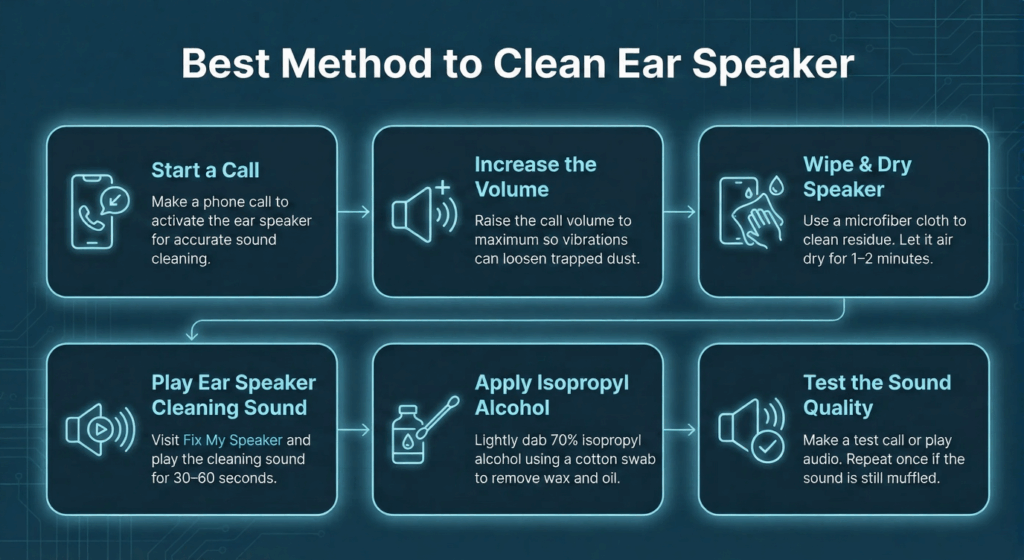
Step-by-Step Process
Start a Phone Call
Start a phone call to activate the ear speaker properly. This helps send the cleaning sound directly to the correct area, ensuring the vibrations work effectively and improve sound.
Increase the Volume
Gradually turn the call volume to its maximum level. The stronger vibrations from the sound waves help dislodge stuck dust and tiny debris from the speaker grill.
Wipe & Dry Speaker
Use a clean microfiber cloth to wipe away any remaining residue. Allow the alcohol to air dry for at least one to two minutes to ensure no moisture remains inside the speaker.
Play Cleaning Sound
Visit Fix My Speaker and play the “Ear Speaker Cleaning Sound” for 30–60 seconds. This special frequency vibrates the diaphragm, pushing out moisture and dirt particles that muffle the audio.
Apply Isopropyl Alcohol
Take a cotton swab lightly moistened with 70% isopropyl alcohol and gently dab it over the ear speaker grill. This helps dissolve sticky earwax, oil, or dust while supporting the vibration cleaning process.
Test the Sound Quality
After drying, make a test call or play audio to check your ear speaker’s clarity. If you still hear muffled sound, repeat the process once for a complete cleanup.
Why You Need Ear Speaker Cleaner Sound
Using an ear speaker cleaner sound app is an easy and effective way to keep your phone’s audio sharp. Over time, dust, wax, or moisture can block the tiny openings in your speaker mesh, dulling the sound. Running a quick sound-cleaning session helps clear out these particles without tools or risk, restoring crisp, natural audio in seconds.
Better Sound Quality
When dirt clogs the speaker mesh, sound waves can’t pass through properly. The cleaner sound uses precise low-frequency tones that shake loose trapped dust and moisture, letting your phone play calls and music clearly again.
Longer Device Life
Regular sound cleaning prevents buildup that can corrode or strain your speaker over time. Keeping it clear helps maintain the speaker’s performance and extends your phone’s lifespan.
Clear and Enjoyable Audio
Nothing ruins a call or song like a muffled sound. A clean speaker means you can enjoy every note, word, and detail without distortion. It improves clarity whether you’re listening to music, gaming, or chatting.
Quick Sound Restoration
The best part is how fast it works. In less than a minute, the cleaner sound removes debris and restores volume and clarity. It’s a simple fix that brings your audio back to normal without any hassle.
How Does Ear Speaker Cleaner Sound Work?
Ear speaker cleaner sound uses targeted audio tones to break up and eject dust, earwax, or moisture from your phone’s speaker. You play the tone through the device, and it vibrates the speaker mesh to loosen clogs. This method fixes muffled audio without tools or disassembly, working well for everyday buildup like pocket lint or post-spill dampness.
🎶 Sound Waves and Vibrations
The app plays low-frequency sound waves that hit the speaker and turn into strong vibrations. These shake the debris loose from the tiny holes in the mesh. Users often feel the phone buzz slightly as dust and wax particles dislodge and fall out.
🔈 Frequency Matching
Debris like earwax sticks at certain vibration levels, so the cleaner picks tones around 200 Hz that match those spots. This resonance makes the particles jump free more easily than random sounds. It targets both dry dust and wet moisture for better results on clogged earpieces.
🚿 Non-Invasive Cleaning
You avoid poking or scraping, which could scratch the speaker or push gunk deeper. The sound method reaches inside safely, keeping your device’s internals intact. This approach suits quick fixes after workouts or rainy days without risking warranty issues.
Benefits of Using Ear Speaker Cleaner Sound
Ear speaker cleaner sound apps offer a quick, safe way to fix muffled audio on your phone. They use targeted vibrations to clear out dust, earwax, or water, keeping your calls and music crisp. Here’s why this method stands out for daily use.
Safe and Non-Invasive
The app plays low-frequency tones that gently shake debris loose without touching delicate speaker parts. Unlike brushes or needles, it won’t scratch the mesh or harm internals. This keeps your phone safe and warranty intact.
Easy and Convenient
You just tap play on the app with no tools or skills needed. It works in under a minute, whether you’re at home or on the go. Anyone can use it, from gamers to casual phone users, with zero setup hassle.
Cost Savings vs Repair
Fixing a speaker at a shop can cost $50 or more. This app clears most issues for free, avoiding pricey repairs or replacements. Regular use keeps your device in top shape without breaking the bank.
Effective for Moisture Removal
Water from spills or humidity can dampen speakers, causing crackling. Paired with a dab of isopropyl alcohol, the app’s tones push out moisture fast. This saves your speaker from corrosion or muffled output.
Restores Optimal Sound Quality
Dust and wax block sound waves, making calls or music sound dull. The cleaner’s vibrations clear these clogs, bringing back sharp, full-volume audio. You’ll hear every detail, from song notes to game sound effects.
Eco-Friendly Approach
Unlike wipes or chemical sprays, sound cleaning skips disposable materials. It relies on reusable tones, cutting down on waste. This makes it a green choice for maintaining your phone’s audio health.
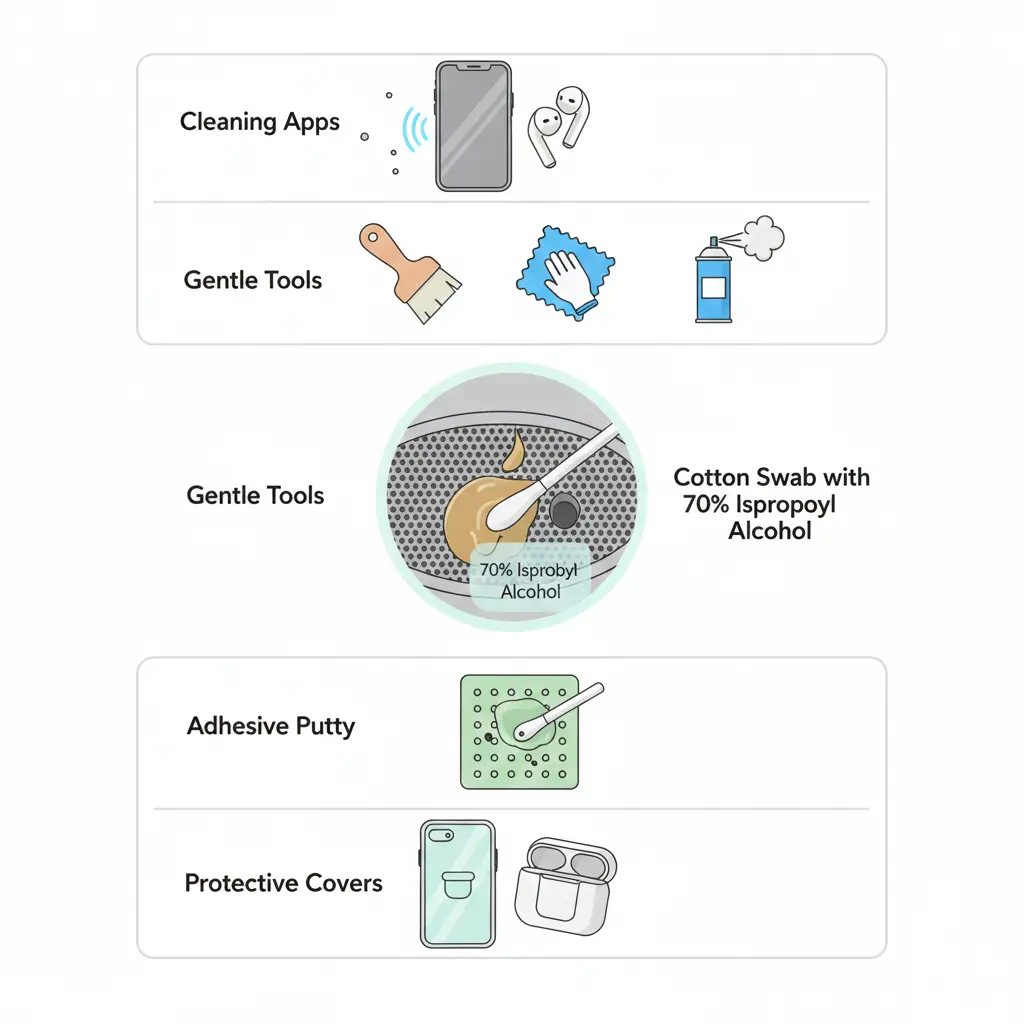
Tools You Need for Cleaning
Gather basic items for safe ear speaker fixes at home. These handle dust, wax, or light moisture without fancy gear. Start with gentle options to avoid scratches.
- Cleaning Apps play vibration tones to shake out particles. They target clogs with frequencies for phones or earbuds.
- Brushes, Clothes, Suction Tools Soft brushes clear grill dust gently. Microfiber cloths wipe residue, while compressed air blows debris without touch.
- Isopropyl Alcohol Use 70% alcohol on a swab for sticky wax. It dissolves grime fast and dries quickly on electronics.
- Protective Gear Cases or covers shield speakers daily. Adhesive putty pulls stubborn dirt safely from meshes.
Conclusion
Regular cleaning keeps your ear speaker sharp, your calls clear, and your music loud. Using sound-based cleaner apps and gentle alcohol wipes, you can remove dust, wax, and moisture safely in minutes. These steps protect your device, extend its life, and save you money.
Gamers benefit most from precise sound, but anyone who values clear calls will notice the difference. If cleaning doesn’t help, check for software issues or seek a technician. Keep your speaker clean and you’ll enjoy crisp, reliable audio every day.