
How to Fix My Speaker: From Low Volume to No Sound
Fix My Speaker
Click the icon below to start the cleaning sound.
Dropped your phone near water? Noticed your phone speaker sounding dull or muffled after a dusty trip? You’re not alone, it happens to almost every phone owner at some point. Most people assume they need a repair shop, but in many cases, the fix is much simpler.
Fix My Speaker tackles this with a 165Hz frequency tone that shakes loose water droplets and debris. It mimics the Apple Watch eject feature and works on iPhones, Android phones, JBL speakers, Xiaomi devices, and even earbuds. You access it right in your browser no downloads needed just hit play and let the sound waves do the job.
This tool clears up fuzzy audio from dust, grime, or water damage without risky methods like rice or sharp tools. It saves you from faint voices, lost bass, or repair shop visits.
What is Fix My Speaker?
Fix My Speaker is a free, browser-based audio cleaning tool. It uses specific low-frequency tones — primarily 165Hz, to vibrate water and dust out of your speaker without physically touching the device.
The concept isn’t new. Apple has built a similar water ejection feature into the Apple Watch for years.
Fix My Speaker brings that same approach to any device, through a simple webpage you can open on any phone or computer. There’s nothing to install, no account to create, and no hidden fees.
It won’t fix a physically broken speaker — but for the vast majority of cases where sound is muffled due to moisture or debris, it works well enough to save you a trip to the repair shop.
Easy Steps to Use Fix My Speaker
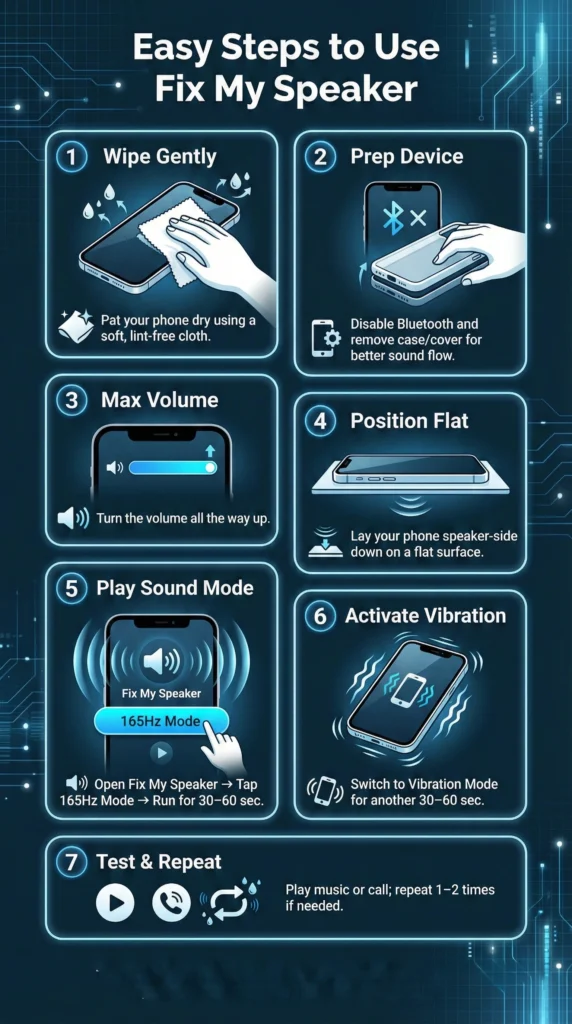
- Wipe Gently: Pat your phone dry using a soft, lint-free cloth to remove surface water.
- Prep Device: Disable Bluetooth, remove any case or cover for better sound flow.
- Max Volume: Turn your phone’s volume all the way up.
- Position Flat: Lay the device speaker-side down on a flat surface.
- Play Sound Mode: Open Fix My Speaker, tap Sound Mode (165Hz) run for 30–60 seconds.
- Activate Vibration: Switch to Vibration Mode for another 30–60 seconds.
- Test & Repeat: Play music or make a call. Repeat 1–2 times if sound improves gradually.
How Fix My Speaker Works
The idea behind Fix My Speaker is simple yet powerful. Every speaker creates sound through vibration, and these same vibrations can push out trapped water and dust blocking the tiny holes in your speaker grille. When you play the special low-frequency tones, the speaker cone moves rapidly to shake loose moisture and debris, while the vibration mode adds gentle movement from your phone’s motor for deeper cleaning.
Together, they work to eject unwanted particles and let sound waves travel clearly again. The process is safe, short, and effective. Usually one or two quick cycles are enough to bring your speaker back to its full, crisp quality.
Features of Fix My Speaker
Fix My Speaker packs simple tools to handle common speaker woes like muffled audio from splashes or grit. It runs in your browser and uses sound and shakes to clear things up. Users grab it after a pool dip or dusty hike to get back clear calls and tunes.
This core tool blasts a 165Hz tone to push water out of your speaker grille, just like the Apple Watch does. Droplets fly free during a quick play, fixing that fuzzy sound from a sink slip or rain. It also shakes out dust for sharper volume right away.
🔊 Sound Mode (165Hz Water Ejection)
The primary cleaning mode plays a 165Hz tone, which creates strong low-frequency vibrations inside your speaker. This is the frequency range most effective at physically displacing water droplets that have settled behind the speaker grille. Run it for 30–60 seconds with your volume at maximum for best results.
📳 Vibration Mode
After the sound cycle, Vibration Mode activates your phone’s built-in motor in a controlled pattern. This adds a second layer of movement to help dislodge any moisture or fine debris the sound waves loosened but didn’t fully eject.
🔊 Left / Right Channel Control
If only one side of your earbuds or stereo speaker sounds off, you can target just the left or right channel individually. This avoids unnecessary sound pressure on the working side.
📻 White Noise Mode
White noise runs a broad frequency sweep that gradually clears fine dust particles. It’s particularly useful for earbuds or laptop speakers where debris is finer and distributed more widely.
🌐 Works in Your Browser
No app installation required. Open the site on any device — iPhone, Android, Windows laptop, MacBook, and it runs immediately. This also means it works on devices where you can’t easily install apps.
Top Benefits of Fix My Speaker
This solution keeps your phone’s audio crisp and saves you hassle after water splashes or dust buildup. It’s a quick, free tool that anyone can use right from their browser. These benefits tackle muffled sound, repair costs, and device wear with ease.
Saves Money on Repairs
Speaker cleaning at a phone repair shop typically costs $20–$80, and that’s assuming there’s no deeper damage. Fix My Speaker handles most moisture and dust cases for free. If the tool resolves the muffled sound, you’ve just avoided an unnecessary repair bill.
No Technical Knowledge Needed
The tool has one button. Set your volume to maximum, open Fix My Speaker, press play, and follow the on-screen progress bar. You don’t need to know anything about how speakers work — the tool handles everything.
No Downloads or Accounts
Some speaker-cleaning apps require you to install software, create accounts, or pay for premium features. Fix My Speaker works entirely in your browser and is free with no registration of any kind.
Safe for Your Device
The sound waves used are within normal playback range. This is no different from playing music through your speaker — it simply uses a specific frequency rather than a song. It won’t void your warranty or risk hardware damage.
The Science Behind Fix My Speaker’s Water Removal
Fix My Speaker uses sound to push water from your speaker without harm. It creates vibrations that move droplets out. Here’s how it breaks down:
- Starts with a strong burst at 165Hz to loosen water from the diaphragm.
- Sweeps through low to high frequencies to shake out stuck moisture.
- Ends with a high-pitch tone to clear any leftover drops on inner surfaces.
- Vibrations force debris through the grille, mimicking Apple Watch tech.
- Changes waves every few seconds for full coverage, avoiding damage.
Safety Measures to Prevent Water Damage
Water can sneak into your phone and ruin the speaker fast. Simple steps help keep it safe from splashes or moisture. These tips stop costly fixes and keep your audio clear.
- Pick a water-resistant phone with high IP ratings like IP67 or IP68. These handle quick dips or rain without letting water reach the speaker.
- Add a waterproof case for extra protection around ports and grilles. It seals out dust and water during beach trips or workouts.
- Apply a screen protector that repels water to block splashes from seeping in. Wipe off any drops right away with a soft cloth.
- Keep hands dry before touching your phone to avoid moisture in small openings like the speaker grille. Always dry the device if it gets wet.
- Stay away from wet spots like pools, sinks, or rain. Even resistant phones can fail with long exposure, so store them safely.
Immediate Actions if Your Phone Gets Wet
If your phone takes an unexpected dip, quick steps can prevent water from reaching the speaker and causing muffled audio or lasting damage. Act within minutes to boost recovery chances here’s what to do right away.
- Power Off Immediately Turn the phone off to avoid short circuits from water conducting electricity. Hold the power button (and volume down on some Androids) until it shuts down. Skip this only if the screen is unresponsive.
- Remove Case and Accessories Take off any case, screen protector, or attached items. Water hides in crevices, so clear them to speed drying and stop moisture from seeping toward the speaker grille.
- Wipe Excess Water Gently pat the exterior with a soft, absorbent cloth focus on ports, speaker, and microphone. Avoid shaking vigorously (it pushes water deeper) or using paper towels that leave lint.
- Position for Drainage Place the phone speaker-side down on a dry surface or tilted slightly. Gravity pulls droplets out naturally. Prop it with a cloth for airflow but keep it stable.
- Avoid Heat Sources Skip hairdryers, ovens, or direct sunlight these drive water inward or warp components. Let it air dry in a cool, ventilated spot instead.
- Resist Testing Too Soon Don’t plug in, turn on, or play sound for at least 24 hours. Early power-up risks frying circuits while moisture lingers.
- Use Fix My Speaker After Initial Drying Once surface water is gone (after 30–60 minutes of draining), open Fix My Speaker in your browser. Max volume, play Sound Mode for 30–60 seconds, then Vibration Mode. This ejects any trapped droplets safely before full drying.
Other Methods to Clean My Speaker

1. Silica Gel
Place a few silica gel packets around your phone’s speaker to absorb moisture safely. These small packets are commonly found in new shoes or clothes. Though it takes time, this method effectively removes water without any risk of damage.
2. Soft Brush
Use a soft, clean brush to gently remove dust and debris from the speaker grill. Avoid pressing too hard to prevent harming internal components. This quick and easy method keeps the sound clear and the speaker free from blockages.
3. Adhesive Putty
Apply a small piece of adhesive putty on the speaker grill and press it gently. When you peel it off, it lifts out the trapped dust particles blocking the sound. It’s a safe, simple, and reusable way to clean speaker holes effectively.
4. Air Blower
An air blower helps dry moisture and blow out fine dust from the speaker area. Always use it at a moderate pressure to avoid damaging sensitive parts. This method is fast and ideal for removing water after accidental splashes.
5. Sticky Tape
Press a small piece of sticky tape lightly over the speaker grill and pull it off slowly. The adhesive surface catches fine dust or dirt stuck inside the holes. It works great for quick cleaning when you don’t have tools available.
6. Vacuum Cleaner Suction
Use a mini vacuum nozzle to gently pull out water or debris from the speaker. Keep it slightly away to prevent excessive suction pressure. This technique helps remove deep moisture effectively without causing internal harm.
Comparison of Fix My Speaker vs. Other Apps
This audio tool stands out with dual modes and broad device fit. Check how it stacks against others in this table.
|
Feature |
Fix My Speaker |
Similar Apps |
|---|---|---|
|
Water Removal Tech |
165-350Hz waves + vibration |
Basic tones only |
|
Dust Cleaning |
Dedicated mode for debris |
Limited or none |
|
Compatibility |
Phones, laptops, earbuds, watches |
Mostly smartphones |
|
Modes |
Sound and vibration combo |
Single mode |
|
Interface |
Clean with progress bar |
Cluttered, no tracking |
|
Cost |
Free, no ads |
Ads or paid features |
|
Saltwater Advice |
Suggests pro help |
Often ignores risks |
|
Educational Info |
Explains science simply |
Little or no details |
Myths and Facts About Fixing Water
Water damage sparks lots of wrong ideas about fixes. Let’s sort myths from facts to handle issues right.
Myths
- Rice dries everything: It absorbs some moisture but misses deep speaker spots and leaves dust.
- Heat speeds drying: Hairdryers push water in further or melt parts, worsening damage.
- Loud music clears water: High volume risks wet speakers more instead of helping.
Facts
- Act fast: Turn off the phone quickly to stop shorts and save internals.
- Silica gel beats rice: It pulls moisture better without residue risks.
- Pros handle tough cases: Experts fix corrosion safely when DIY fails.
- Sound waves work: Specific tones vibrate water out without touch.
Conclusion
A muffled speaker is frustrating, but it’s rarely a reason to panic or immediately head to a repair shop. In most cases where water or dust is the cause, the fix takes less than two minutes and costs nothing.
Fix My Speaker was built specifically for this problem, to give you a reliable, safe, browser-based way to handle it yourself. Use it after a splash, after a dusty commute, or any time your audio sounds off. If the sound doesn’t improve after two or three cycles, that’s a signal worth taking to a technician, but in our experience, most cases resolve on their own with a bit of time and the right frequency. Keep the link saved. You’ll probably need it again.